
Photo to Coloring Page
Upload a photo, frame it and pick a style. The AI redraws it as a printable coloring page that stays private in your account.
Example result
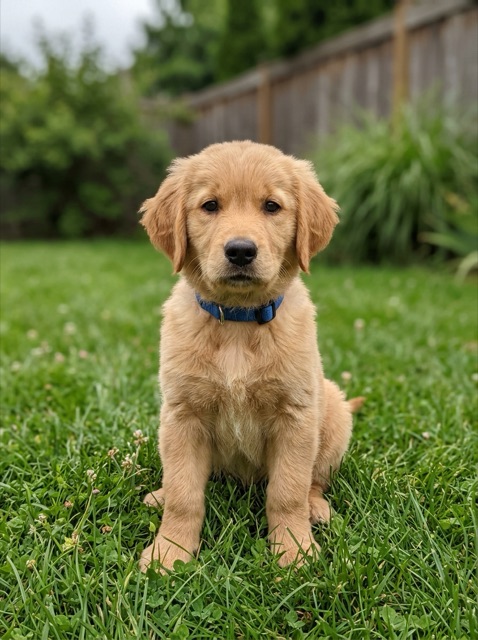
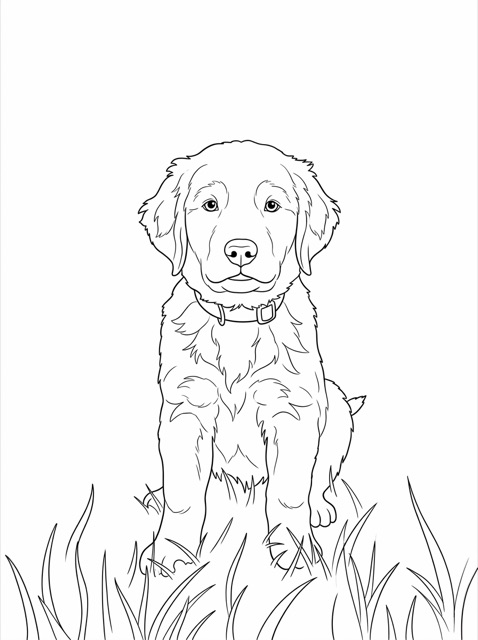
Example photos were made for this site; every coloring page is real output from this tool. Pick an example or a style to compare.
- 1One clear subject, such as a pet, a person or a favorite toy.
- 2Good daylight. Very dark or blurry photos lose detail.
- 3Zoom in so the subject fills most of the frame.
- 4A plain background gives a cleaner page to color.
01How it works
How to turn a photo into a coloring page
- 1
Upload and frame your photo
Choose a JPG, PNG or WebP photo, then drag and zoom it inside the page frame. The coloring page is made from what you see inside the frame, and very dark or small photos get a warning before you spend credits.
- 2
Pick a style and page shape
Choose Default, Cartoon, Simple or Pencil, and one of seven page shapes, from portrait and square to phone and widescreen. The two-credit cost is shown next to the button before you create.
- 3
Download and print
Your photo is redrawn as a coloring page and saved privately. Download a PNG plus A4 and US Letter PDFs, and print at 100% scale.
02Ideas
Photos that make good coloring pages
The best photos have one clear subject, good light and a simple background. Zoom in so the subject fills most of the frame; a person or pet far away in a busy scene turns into small, crowded shapes.
- Pets
- A dog or cat photo where the whole animal is in view.
- Kids and family
- A birthday, a first day of school or a family portrait.
- Favorite things
- A toy, a bike, a car or a treehouse.
- Places
- Your home, a holiday spot or a school building.
03Styles
Four photo styles
- Default
- Clean black outlines that stay close to your photo.
- Cartoon
- A playful cartoon version of the same subject and pose.
- Simple
- Bold lines, big shapes and less background for young kids.
- Pencil
- A soft pencil sketch that keeps light gray shading.
Default, Cartoon and Simple pages are clean black outlines for crayons, markers and colored pencils. Pencil keeps soft gray shading, which looks like a sketch and suits older kids and adults who like to color over tones. Portrait pages suit people and pets, landscape pages suit places and groups, and square pages suit close-ups.
04Privacy
Your photos stay private
Your photo is resized in your browser and uploaded without its camera and location details. It is kept in private storage that only your account can open, used to draw your coloring page, and never added to the public library. Only upload photos you have the right to use, and keep it family-friendly: see the Acceptable Use Policy and the Privacy Policy. Want a page without a photo? Try the AI coloring page generator or browse the free coloring page library.
05FAQ
Photo to coloring page questions
How many credits does a photo coloring page cost?
Each photo coloring page uses two credits. Credits are reserved when you submit and only charged when a printable page is ready, so a photo that cannot be converted does not use any credits. New accounts get six free credits, enough for three photo pages.
Which photos can I upload?
JPG, PNG and WebP photos up to 10 MB, at least 256 pixels on the shorter side. Photos of pets, children, family, favorite toys, houses and places all work. Use a photo you took yourself or have permission to use, and ask before uploading a photo of someone else.
What happens to my photo?
Your browser crops and resizes the photo and removes its camera and location details before anything is uploaded. The photo is then stored privately in your account and sent to our image provider APIMart, where Google’s Nano Banana 2 (Gemini 3.1 Flash Image) model redraws it as a coloring page. It is never added to the public library, and you can ask us to delete your account and creations at any time.
Will the coloring page look exactly like my photo?
The AI redraws your photo as line art, so the subject, pose and layout follow the photo but small details, text and faces can come out a little different. Default stays closest to the photo; Cartoon and Simple change the look on purpose. Check each page before you print or share it.
Why was my photo not converted?
Uploaded photos are checked by an automated content filter before a page is drawn, and every finished page is checked again before you see it. Photos or pages with sexual, violent or otherwise harmful content are refused, and a page is also stopped if the result is not clean enough to print. In every case no credits are used, and you can try a different photo.